

If you're looking for Together AI alternatives, you've probably run into a limit: a growing bill, a model you can't get, or responses that slow down when traffic picks up. Maybe you need firmer service guarantees or more hands-on engineering help. In any case, whatever's getting in your way should drive which alternatives you test. This article will help you choose which options are worth your time.
Start by exploring either Parasail, Fireworks, Baseten, DeepInfra, or Modal based on your specific needs. This comparison weighs all five across latency, cost, reliability, and engineering access, with shorter sections on Groq and Cerebras. Together stays in the comparison because switching deployment options may address the problem without the headache of migrating.
Compare Together AI alternatives at a glance
Use this table to shortlist providers to investigate. The descriptions summarize product offerings, not measured performance rankings.
| Provider | Latency controls | How you pay | Reliability commitment | Engineering support |
|---|---|---|---|---|
| Together | Dedicated endpoints: choose a deployment profile that sets quantization, parallelism and hardware | Serverless Inference: per token. Provisioned Throughput: per throughput unit, per minute. Dedicated Inference: per GPU-hour | Provisioned Throughput: 99% availability on eligible traffic within purchased capacity; overage excluded | Standard: business-hours support for all customers. Enterprise: 24/7 response targets and a Slack channel to engineers |
| Parasail | Elastic Endpoints: dedicated GPU performance. Dedicated Deployments: reserved GPUs tuned to the workload | Serverless and Elastic Endpoints: per token. Dedicated Deployments: per GPU-hour, by quote | Elastic Endpoints and Dedicated Deployments: negotiated latency SLA targets 99.9% uptime | Direct engineering support on every committed deployment |
| Fireworks | Serverless: Standard, Priority or Fast mode. On-demand deployments: tuned defaults and deployment controls | Serverless: per token. On-demand deployments: per GPU-second. Reserved Throughput: reserved dollar-per-minute amount | Reserved Throughput: throughput SLA on traffic within the reservation. Serverless: no SLA | Enterprise: response targets by priority, from one hour for urgent issues; shared Slack channel |
| Baseten | Dedicated Inference: you pick the GPU and control autoscaling | Model APIs: per token. Dedicated Inference: compute billed by the GPU-minute | 99.9% monthly availability SLA on Dedicated Inference and Model APIs; excludes failures from scaling past reserved capacity. Enterprise: custom SLAs | Basic: email and in-app chat. Pro: hands-on engineering, Slack and Zoom support |
| DeepInfra | API: Standard, Priority or Flex tier, set per request. Custom LLMs: dedicated GPUs with autoscaling | API: per token. Custom LLMs: per GPU-hour, billed by the minute | API: none published. DeepCluster: Tier 3 datacenter with a 99.982% uptime SLA | Enterprise: dedicated technical expert. DeepCluster: 24/7 monitoring and operations |
| Modal | Shared Endpoints: managed hardware and autoscaling. Dedicated Endpoints: you control autoscaling and regions | Shared Endpoints: per token. Dedicated Endpoints: per GPU-second of compute used | Set per service order; no public SLA | Starter and Team: community Slack. Enterprise: private Slack and embedded ML engineering |
| Groq | Service tier set per request: performance, on_demand, flex or auto | Developer: per token. Performance tier: provisioned capacity bundles | Performance tier: 99.9% availability SLA and 99% latency guarantee, detailed in the enterprise agreement | Developer: chat. Enterprise: dedicated support |
| Cerebras | Dedicated Inference: tune capacity, draft models, model configuration and quantization | Developer: per token. Dedicated Inference: enterprise only, by quote | Enterprise: custom SLAs | Enterprise: dedicated support, per a 2024 Cerebras release |
Public-source evidence checked October 12, 2026. Model eligibility, limits, and agreement terms require product-specific checks.
Set your requirements before comparing providers
First establish the model version, required context length, output quality, and API behavior your application needs. Then compare four things:
- Latency: Measure time to first token and completion time at your normal load and during bursts. Include the slowest requests your application must tolerate.
- Cost: Calculate the bill for your input, output, and cached tokens, or allocated compute. Include minimum commitments, warm capacity, retries, and network charges where applicable.
- Reliability: Record successful completions and errors, then check which traffic the agreement covers. Keep operational results separate from contractual promises.
- Engineering access: Establish who helps, what work is included, when help is available, and which response commitments apply.
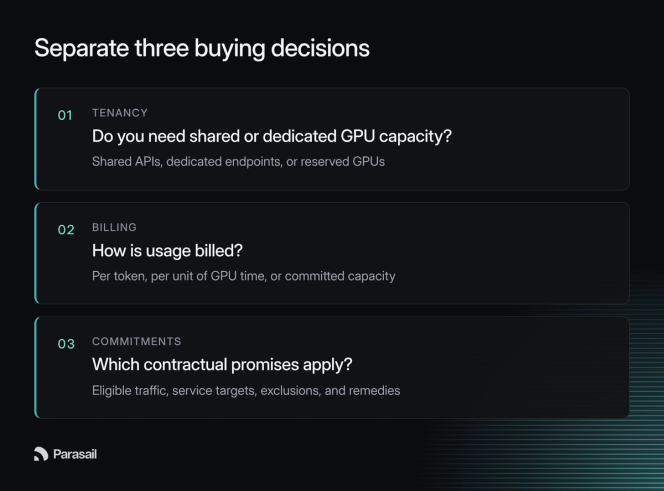
Once you’ve established a baseline, you can then determine the evaluation criteria for your workload. Start by deciding whether your deployment needs shared or dedicated GPU capacity, then evaluate how usage is billed and which contractual promises apply.
Check Together's options before switching
Before migrating, check whether another Together product meets your requirements. Its Dedicated Endpoints offer selectable configurations, while serverless requests may be limited during high demand. Available controls depend on the deployment you choose.
Your SLA may not hold past purchased capacity
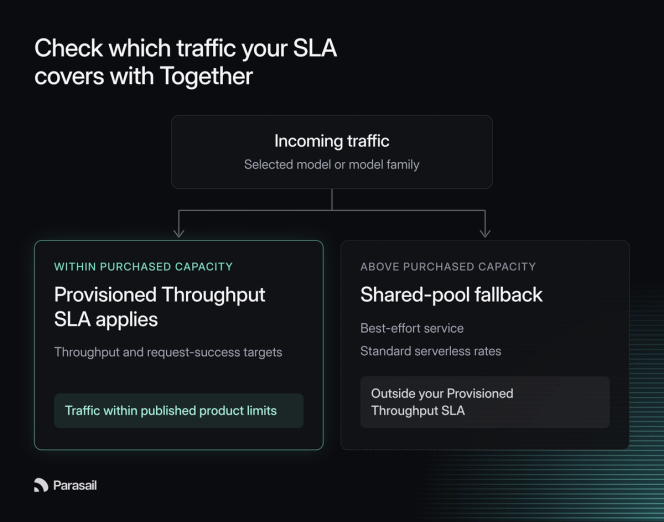
For cost, distinguish serverless token charges, dedicated hardware time, and provisioned throughput units (PTUs). PTUs reserve capacity for a selected model or model family for a term of at least 1 month. Unused capacity doesn't roll over. The throughput commitment and request-success SLA apply to eligible traffic within purchased capacity and product limits. Excess traffic may use the shared pool at serverless rates on a best-effort basis, without that SLA.
For production traffic, that means bursts beyond your reservation can have less predictable response times and additional serverless charges. Test overflow against your application's latency and cost limits.
24/7 support and response targets require an Enterprise commitment
Together's support page lists two tiers. Standard is included for every customer and answers questions during Pacific business hours on a best-effort basis. Enterprise is for customers with an annual commitment on Inference, GPU Clusters, or Model Shaping and adds 24/7 coverage, a 30-minute response target for urgent issues, priority queueing, and a Slack channel to Together's engineers. Neither tier lists an engineer assigned to your account or help tuning your workload. Check that scope if you need someone to optimize your deployment as well as respond to incidents.
Stay with Together if their product meets your model, economics, capacity, and support requirements. If it doesn't, carry the specific unmet requirement into the alternatives comparison. That gives you a concrete migration test.
Evaluate Parasail for custom models and negotiated SLAs
Consider Parasail’s Elastic Endpoints when you need a custom model or a catalog model tuned to your latency targets, but you don’t have steady enough traffic to keep a GPU busy around the clock. Evaluate Dedicated Deployments when you need hardware reserved only for you, or Serverless Endpoints when shared capacity is acceptable.
Latency: We tune each deployment against a latency target set for that workload with methods laid out in our sub-second inference post. Dedicated Deployments and Elastic Endpoints can include negotiated latency SLAs, and performance engineers build and tune to targets such as tokens per second and concurrent requests.
Cost: Elastic Endpoints and Serverless Endpoints bill per token with no hardware commitment or idle charge. Elastic Endpoints cost 1.25× the model's Serverless input and output token rates on selected models. Sales sets up each endpoint and quotes models outside that list. Dedicated Deployments bill reserved GPUs by the hour, including idle time. Compare the full commitment and expected usage alongside the unit price.
Reliability: We target 99.9% uptime on every committed deployment and Dedicated Deployments and Elastic Endpoints include negotiated SLAs. Section 3.2 of our public terms describes service levels for the dedicated service as objectives. Section 1.1 allows a separately executed agreement. Put any guarantee in that agreement and specify eligible traffic, measurement windows, exclusions, and remedies.
Engineering access: On Elastic Endpoints, we deploy the model and tune the workload for you. On Dedicated Deployments, performance engineers build the deployment and keep tuning it to targets such as tokens per second and concurrent requests. Dedicated Deployments also include dedicated support, meaning a performance engineer stays on your account and is available via Slack. Response times for production incidents are agreed upon in your contract.
Shortlist Parasail’s Elastic Endpoints for a fine-tuned model on per-token billing or if your product has strict latency requirements and uneven traffic. Evaluate Dedicated Deployments when you have sustained traffic that makes reserved hardware economical.
Use Fireworks for managed serving with deployment controls
Consider Fireworks when you want managed Serverless inference with a path towards more control. On-Demand deployments give you dedicated GPUs with configurable serving.
Latency: Serverless requests run on Standard, Priority, or Fast tier. On-Demand deployments can inherit a model's default speculative-decoding configuration. With model-based speculation, a draft model proposes tokens for the target model to verify. You can override the drafter and related settings, but Fireworks advises testing representative traffic because a poor match can slow generation. Decide whether the managed default meets your budget or a custom configuration merits the work.
Cost: Serverless bills by token and On-Demand bills by GPU time. Reserved Throughput is a fixed dollar-per-minute commitment priced at Serverless list rates. Each minute, eligible usage draws against that amount. Unused spend expires at the end of each minute. Usage above the reservation bills at list price. A reservation sized to peak traffic therefore costs more per token in quiet hours. Price it against your traffic across a full day before you commit. Fireworks agrees with you on which models the reservation covers. Moving it to a different model goes through the account team.
Reliability: Reserved Throughput's SLA covers traffic within the reservation. Usage above it runs at standard Serverless pricing and rate limits with no SLA. For ordinary Serverless, Fireworks' own pages disagree. The service levels FAQ says Serverless has no SLA. The Serverless 2.0 announcement says a 99.9% SLA covers platform failures. It excludes requests shed when the shared fleet is saturated. Ask Fireworks which applies before you rely on either. On-Demand deployments scale to zero after an hour without traffic by default. Requests then return a 503 until the deployment scales back up. Add retry logic to your client for that case.
Engineering access: Fireworks publishes Enterprise support terms. Response times run from one hour for urgent production issues to two business days for low-priority requests. Enterprise customers also get an assigned support representative and a shared Slack channel if they use Slack. The page does not mention performance tuning, so ask whether optimization work is included in your plan.
Shortlist Fireworks when a catalog model on Serverless meets your latency target and you want a Reserved Throughput SLA on steady traffic. Evaluate On-Demand deployments when you have engineers who can tune autoscaling and speculative decoding themselves. Without that team, ask whether an Enterprise contract includes tuning before you commit.
Evaluate Baseten for dedicated serving and engineering help
Consider Baseten when your model needs a dedicated configuration and you want engineering support with it. Baseten's Dedicated Inference offering pairs single-tenant deployments with an optimized inference stack.
Latency: Baseten offers two serving paths. Model APIs serve pre-optimized models. Dedicated deployments run your model on single-tenant infrastructure, and Baseten says its engineers customize them for latency, throughput, and cost targets. Bring representative requests to that tuning discussion, then test the result against your latency and quality requirements.
Cost: Model APIs are priced per token. Dedicated deployments are priced per GPU minute. Include warm replicas (running copies of your model) and model-loading time in your estimate because both are billable. Scaling to zero removes idle replica charges, but the next request waits for startup. Choose the warm-capacity setting alongside your latency budget, then calculate the bill for that setting.
Reliability: Baseten's published SLA sets 99.9% monthly availability for Model APIs and Dedicated Inference on Baseten-managed infrastructure. Self-hosted deployments are excluded. So are errors and throttling caused by reserving too little capacity, choosing on-demand over reserved capacity, or scaling past what you reserved. Credit requests are due by email within 24 hours of the downtime, so check that your incident process can meet that window.
Engineering access: Pro advertises hands-on engineering expertise and dedicated Slack and Zoom support. The pricing page doesn't say how much optimization work is included or whether the same engineer stays on your account. Ask both questions before you sign.
Shortlist Baseten when you need a dedicated deployment and want the provider's engineers to tune it. It’s a weaker fit for bursty traffic because warm replicas bill while idle, and the SLA excludes scaling past reserved capacity.
Compare DeepInfra's API tiers and custom deployments
Consider DeepInfra when you want a managed model API with selectable service tiers or a private deployment for your own weights. Those paths have different billing and capacity considerations, so price the one your application will actually use.
Latency: DeepInfra's Standard, Priority, and Flex tiers change how API requests are scheduled. Priority goes ahead of Standard traffic at 1.5x the base price. Flex costs 0.8x the base price and accepts slower responses and occasional unavailability. Tier availability varies by model, so check the model page. Test the tier you'd run in production, and don't treat scheduling priority as a throughput reservation.
Cost: Compare the chosen model's input and output rates, plus the cached-input rate where the model lists one. Custom LLM deployments instead bill for GPU uptime regardless of traffic. Their autoscaling settings control minimum and maximum running instances, including scale-to-zero. Estimate how much capacity must stay running before comparing that bill with the shared API.
Reliability: DeepInfra’s custom LLM documentation explicitly says GPU availability isn't guaranteed during scale-up. If a burst must be served immediately, keep enough instances running to absorb the excess traffic before choosing the autoscaling configuration. Confirm API availability commitments in the applicable service order; infrastructure claims alone don't establish the terms covering inference requests.
Engineering access: DeepInfra routes technical and product questions to a feedback form. Its sales page offers a conversation with a dedicated technical expert. Neither page lists support tiers or response times, so ask what support your API or custom deployment purchase includes.
Shortlist DeepInfra's API when a listed model and tier meet your cost and latency requirements. Its custom deployments suit private weights with predictable traffic, but it’s a weaker fit when you need a published uptime commitment or guaranteed capacity during bursts.
Use Modal when you want adaptable serving code
Consider Modal when you want managed inference now and the option to change the serving code later. Its Endpoints documentation distinguishes Shared Endpoints from Dedicated Endpoints, whose generated source you can inspect or adapt.
Latency: Shared Endpoints provide managed serving for selected models. Dedicated Endpoints offer configurable autoscaling and support custom weights. They scale to zero when idle by default, so set minimum containers if cold starts would break your latency budget. Test the chosen model and configuration with representative requests. Source access lets you change serving behavior, but it doesn’t make the endpoint faster on its own.
Cost: Shared Endpoints bill per token. Dedicated Endpoints bill per second or per hour of GPU compute used and cost nothing while scaled to zero. For a dedicated deployment, account for startup work, any capacity kept warm, plan fees, and applicable credits. Pinning compute to a region adds a price multiplier. Plan credits don’t apply to Shared Endpoint usage. Reservations are not required, so negotiate any committed-capacity terms separately.
Reliability: Modal attaches uptime and support SLAs to service orders for eligible subscription plans. The public terms state no uptime percentage, so get the agreement for the plan you're buying, and test how your application handles interrupted or retried requests. A description of underlying compute behavior doesn't establish the request-level outcome or contractual coverage.
Engineering access: Starter and Team plans list community Slack access. Enterprise adds private Slack support and embedded machine-learning engineering services. Compare those inclusions with the work you expect your own team to own.
Shortlist Modal when you want to inspect or change the serving code behind a dedicated endpoint. Shared Endpoints fit when a selected model works without customization. Modal is a weaker fit for teams that want a published SLA or tuning help below the Enterprise plan.
Evaluate Groq for fast inference on catalog models
Include Groq when a model in its catalog fits your application and response speed is the priority. Start with the model catalog, which marks each model as production or preview. Preview models are for evaluation only and can be discontinued at short notice.
Groq runs inference on its own LPU hardware and bills Developer accounts per token. You choose a service tier on each request. On-demand is the default, and Flex offers higher limits on a best-effort basis. Enterprise customers can buy Performance capacity bundles, which list a 99.9% availability SLA and a 99% low-latency guarantee.
Those guarantees apply only to the Performance tier. It is enterprise-only and priced on request. It also supports only a few models, so check that yours is listed. On-demand requests can queue during peak times. Custom models and LoRA fine-tunes are limited to Enterprise.
Developer accounts list chat support and Enterprise accounts list dedicated support. The plan page gives no response times for either. Weigh that access alongside the cost and latency of the tier you’d run. Then replay the same workload on each tier you qualify for and check whether the higher tier improves your response times.
Consider Cerebras for generation speed on a short model list
Include Cerebras when one of its supported models fits your application and generation speed is the priority. Shared inference serves the public catalog with per-token billing on the Developer tier. Dedicated Inference reserves capacity for enterprise customers.
Cerebras publishes generation speed for each model in its catalog. The listed figures are more than a thousand tokens per second. Dedicated Inference accepts fine-tuned weights that match the architecture of the endpoint’s model. It also lets you tune capacity, draft models, model configuration, and quantization for your workload.
The public catalog is short, so confirm your model is on it before you plan around Cerebras. Dedicated Inference has no published price and is sold to enterprise customers only. Cerebras advertises uptime guarantees on its Enterprise plan. That page gives no percentage, so get the terms in your agreement.
The Enterprise plan also lists dedicated support. Cerebras gives no response times there and does not say whether tuning help is included. Ask what dedicated support covers for your endpoint. Then test latency and successful completions under your own load.
Build your shortlist around the workload
Use your traffic pattern and operating requirements to narrow the field. These scenarios are evaluation recommendations, not benchmark results.
| Your workload | Compare first | What could change your choice |
|---|---|---|
| Bursty interactive requests on a catalog model | Shared APIs and dedicated endpoints billed per token: Parasail’s Elastic Endpoints, Fireworks Serverless, DeepInfra’s API, Groq | Latency of your slowest request during bursts, rate limits, and cached-input pricing |
| Sustained traffic with an uptime promise to your own customers | Reserved capacity with an SLA: Parasail Dedicated Deployments, Together Provisioned Throughput, Fireworks Reserved Throughput, Baseten Dedicated Inference | Total cost, which traffic the SLA covers, and what happens to overflow |
| Custom weights or specialized serving behavior | Deployments that accept your weights: Parasail Elastic Endpoints, Baseten Dedicated Inference, DeepInfra Custom LLMs, Modal Dedicated Endpoints | Output quality, configuration control, dedicated GPU cost, and ongoing engineering work |
Pick two or three offers from the row that matches your workload. Send each the same representative requests and record differences in model version, configuration, and region. Include a quiet period and a burst as well as steady traffic, so your comparison reflects the service you need throughout the day.
Track cost per successful completion that meets your quality and latency requirements. Include paid retries and unused committed capacity in the bill. Get the service terms for the exact offer before deciding whether the measured result justifies a migration.
Bring your workload to Parasail
If Parasail makes your shortlist, start with the model catalog and see if your model is listed. Sign in and run your own requests on Serverless Endpoints to evaluate how it handles your latency and quality requirements. Use those results to evaluate Parasail alongside the other offers on your shortlist. For a fine-tuned model, contact us directly about Elastic Endpoints.


